This site contains affiliate links. We may earn a commission if you buy through our links, at no extra cost to you.
Get Our Best Deals
HomeCategoriesGaming Monitors
Buying Guide
Updated June 4, 2026

Best Gaming Monitors
of 2026

Tested for refresh rate, response time, color accuracy.

Research Snapshot

  • 3 Products Evaluated
  • Market Comparison Ready
  • No Sponsored Content

Affiliate Disclosure

At Blank2Done, we maintain independence by testing and researching products thoroughly. Some links on this page are affiliate links. If you click through and make a purchase, we may receive a small commission at no additional cost to you. This helps support our research and keeps our reviews free for everyone.

#At a Glance: Comparison Table

Product
Best OverallASUS ROG Swift 27 4K QD-OLED
Best ValueLG 27GP95U-B 4K Nano IPS
Best CurvedSamsung Odyssey G7 32 240Hz Curved
Price$899.99$499.99$449.99
Panel27-inch QD-OLED27-inch Nano IPS32-inch VA QLED 1000R
Resolution3840x2160 4K3840x2160 4K2560x1440
Refresh240Hz
Research Rating
Shop NowShop NowShop Now

In-Depth Analysis

Best Overall

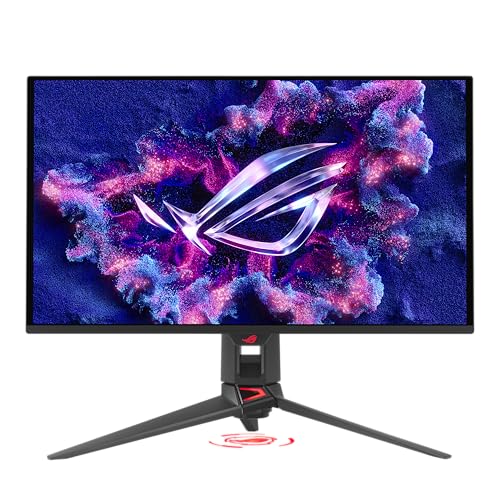
ASUS ROG Swift 27 4K QD-OLED

ASUS

ASUS ROG Swift 27 4K QD-OLED
$899.99$1,099.99

As an Amazon Associate we earn from qualifying purchases.

RTINGS top pick. 4K QD-OLED 240Hz 0.03ms.

The Good

  • Perfect QD-OLED blacks
  • 240Hz at 4K
  • 0.03ms GtG
  • G-Sync+FreeSync

The Bad

  • Premium near $900
  • Burn-in risk

Key Specifications

Panel

27-inch QD-OLED

Resolution

3840x2160 4K

Refresh

240Hz

Best Value

LG 27GP95U-B 4K Nano IPS

LG

LG 27GP95U-B 4K Nano IPS
$499.99$799.99

As an Amazon Associate we earn from qualifying purchases.

Best 4K value. Nano IPS 160Hz OC.

The Good

  • Nano IPS 98% DCI-P3
  • G-Sync + FreeSync
  • 160Hz OC

The Bad

  • IPS glow in dark

Key Specifications

Panel

27-inch Nano IPS

Resolution

3840x2160 4K

Best Curved

Samsung Odyssey G7 32 240Hz Curved

Samsung

Samsung Odyssey G7 32 240Hz Curved
$449.99$799.99

As an Amazon Associate we earn from qualifying purchases.

32-inch 1000R curved VA 240Hz.

The Good

  • Immersive 1000R curve
  • QD color 125% sRGB
  • 240Hz 1ms

The Bad

  • VA narrow viewing angles

Key Specifications

Panel

32-inch VA QLED 1000R

Resolution

2560x1440

The Definitive Gaming Monitors Buying Guide

How to Choose a Gaming Monitor

Match panel technology, refresh rate, and resolution to your use case.

Panel Technology

QD-OLED = best picture quality. IPS = best viewing angles. VA = best contrast. Avoid TN.

Match Your GPU

4K 240Hz needs RTX 4080+. For RTX 4060-4070: 1440p 144-165Hz is the sweet spot.

RG

Rory Goddard

Lead Editor & Founder

With over two decades in customer service, sales engineering, and fault resolution, Rory brings a practitioner's eye to every recommendation. Having spent years diagnosing customer pain points and matching solutions to real-world problems, he understands that the best product is the one that actually solves your problem — not the one with the best marketing.

Frequently Asked Questions

1440p or 4K?
1440p 144-165Hz is the sweet spot. 4K needs RTX 4080+.
OLED burn-in?
Modern OLEDs include pixel shifting. Low risk with varied content.
G-Sync vs FreeSync?
Most work with both. Enable in monitor OSD + GPU control panel.
Need 240Hz?
Only for competitive FPS. 144-165Hz is fine for casual gaming.

Important Notice

Product prices and availability are accurate as of June 4, 2026 and are subject to change. Any price and availability information displayed on Amazon.com at the time of purchase will apply to the purchase of this product.